
Apple Health Export Format Reference
The exact CSV columns and JSON schemas vitalina produces when you export your Apple Health data - plus a searchable dictionary of all 131 exportable metrics and their units. A reference for developers, researchers, and anyone who wants to know exactly what they get before they export.
Last updated: August 2nd, 2026

By Martin
Co-founder, vitalina

vitalina exports your Apple Health data in two machine-readable formats. Both can be opened, analyzed, or imported into other tools.
vitalina exports in three formats. This page documents the two machine-readable ones; for guided, format-specific walkthroughs see Export to CSV, Export to JSON, and Export to PDF.
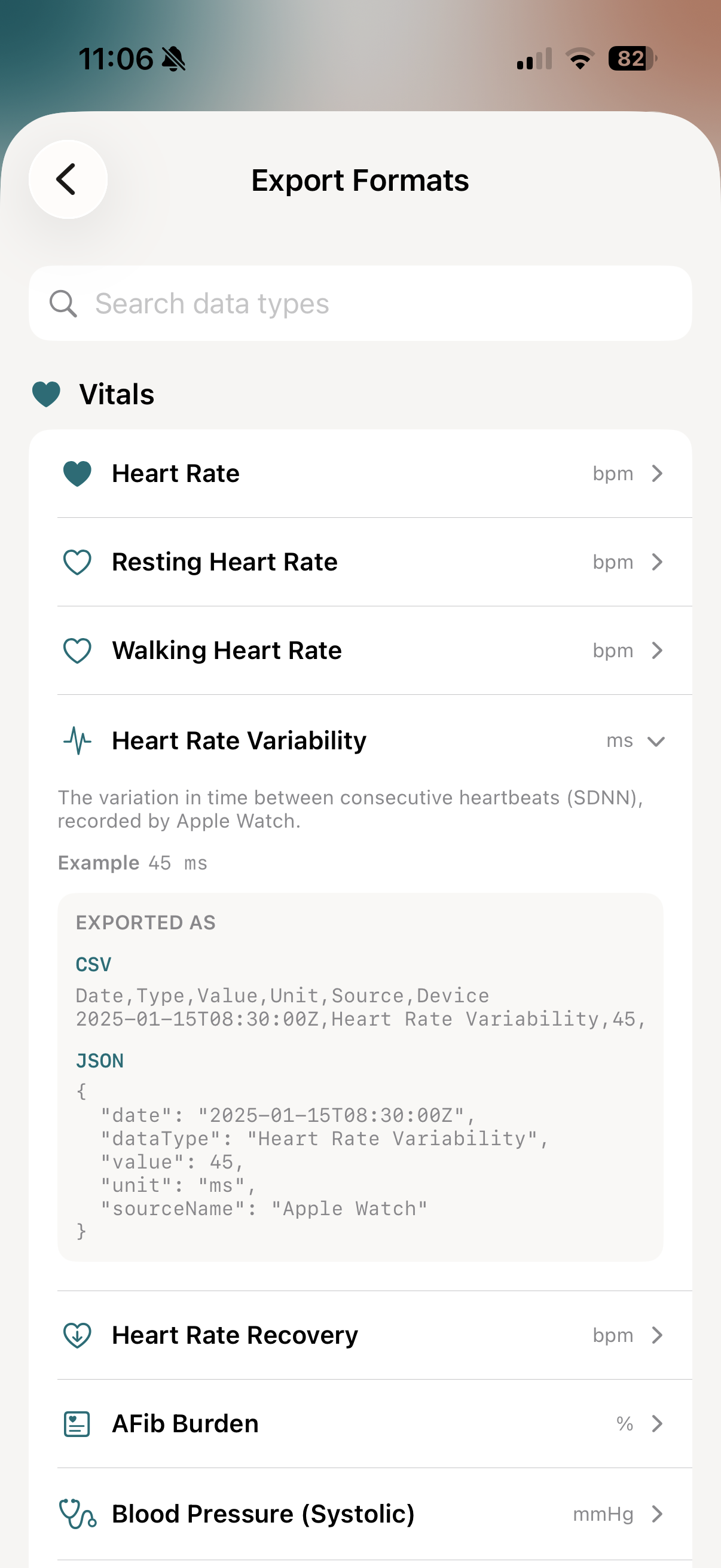
CSV (Comma-Separated Values)
Opens directly in Excel, Google Sheets, Numbers, or any spreadsheet app - and parses in pandas or Python's csv module with zero preprocessing. Every file is a single table with its header on line 1, using RFC 4180 escaping and UTF-8 encoding with a byte-order mark (BOM) so Excel on Windows renders °C and accented characters correctly.
Health Records
Heart Rate, Steps, Blood Pressure, symptoms, and most other metrics
| Column | Description |
|---|---|
| Date | ISO 8601 timestamp |
| Type | Data type name |
| Value | Numeric measurement - or a text level for category types like symptoms and cycle symptoms (severity: Not Present, Present, Mild, Moderate, Severe; presence: Not Present, Present; flow: Light, Medium, Heavy; test: Positive, Negative) |
| Unit | Unit of measurement (bpm, count, kg, …); empty for category levels |
| Source | App or device that recorded the data |
| Device | Hardware device name (if available) |
Sleep Analysis
Nightly sleep session breakdown
| Column | Description |
|---|---|
| Date | Night date (yyyy-MM-dd) |
| Total Sleep | Total sleep duration (h:mm) |
| Time in Bed | Total time in bed (h:mm) |
| REM | REM sleep duration (h:mm) |
| REM % | REM as percentage of total sleep |
| Deep | Deep sleep duration (h:mm) |
| Deep % | Deep as percentage of total sleep |
| Core | Core (light) sleep duration (h:mm) |
| Core % | Core as percentage of total sleep |
| Awake | Time awake during the night (h:mm) |
| Heart Rate | Average sleeping heart rate (bpm) |
| Respiratory Rate | Average respiratory rate (breaths/min) |
| Source | Recording app or device |
Workouts
Individual workout sessions
| Column | Description |
|---|---|
| Date | ISO 8601 start timestamp |
| Type | Workout type (Running, Cycling, …) |
| Duration | Elapsed time (h:mm:ss or m:ss) |
| Distance (km) | Total distance in kilometers |
| Energy (kcal) | Active calories burned |
| Avg HR | Average heart rate (bpm) |
| Min HR | Minimum heart rate (bpm) |
| Max HR | Maximum heart rate (bpm) |
| Cadence | Steps or revolutions per minute |
| Elevation Gain | Meters climbed |
| Temperature | Ambient temperature (°C) |
| Source | Recording app or device |
| Activity Type ID | HealthKit's numeric workout activity code (e.g. 37 = Running) - a locale-stable identifier, since the Type column is localized |
| Duration (s) | Elapsed time as plain seconds, ready for spreadsheet sums and averages without parsing h:mm:ss |
ECG Summary
One row per ECG recording (ecg.csv)
| Column | Description |
|---|---|
| Date | ISO 8601 timestamp of the recording |
| Classification | Apple Watch classification (Sinus Rhythm, Atrial Fibrillation, …) |
| Average Heart Rate (bpm) | Average heart rate during the recording |
| Sampling Frequency (Hz) | Voltage samples per second |
| Number of Measurements | Total voltage samples in the strip |
| Symptoms | Whether symptoms were reported (Yes/No) |
| Source | Recording app or device |
| Device | Hardware device name (if available) |
ECG Waveforms
Full voltage traces for all strips in one table (ecg-waveforms.csv, single-type ECG export)
| Column | Description |
|---|---|
| Strip | 1-based recording index matching the row order of ecg.csv |
| Strip Date | ISO 8601 timestamp of the recording the sample belongs to |
| Time (s) | Seconds since the start of the recording |
| Voltage (µV) | Measured voltage in microvolts |
Empty cells mean the data was not recorded for that entry. Most spreadsheet apps handle this gracefully. Every file starts with a UTF-8 byte-order mark (BOM): Excel uses it to detect the encoding, pandas skips it automatically, and Python readers can pass encoding="utf-8-sig".
Zip bundles & metadata.json
Each .csv file holds exactly one table. When an export produces more than one table (an "Export All" report, or an ECG export with waveforms) or includes the optional patient details, vitalina packages everything into a single zip archive that unpacks to one folder. A metadata.json file inside identifies each table programmatically - no matching on column names required - and carries the patient details separately from the data files, so they can be removed without touching any measurement.
{
  "app" : "vitalina",
  "exportDate" : "2026-08-01T10:00:00Z",
  "files" : [
    { "file" : "metrics.csv", "rows" : 36842, "section" : "metrics" },
    { "file" : "sleep.csv", "rows" : 214, "section" : "sleep" },
    { "file" : "workouts.csv", "rows" : 87, "section" : "workouts" }
  ],
  "formatVersion" : "2.0",
  "patient" : { "dateOfBirth" : "1968-03-14", "name" : "Anna Musterfrau" },
  "timeWindow" : {
    "end" : "2026-08-01T00:00:00Z",
    "start" : "2025-08-01T00:00:00Z"
  }
}
JSON (JavaScript Object Notation)
Structured format for developers, data scientists, and automated pipelines. Pretty-printed with sorted keys.
Health Records
Heart Rate, Steps, Blood Pressure, and most other metrics
{
  "dataType": "Heart Rate",
  "exportDate": "2025-01-15T10:30:00Z",
  "exportVersion": "1.0",
  "summary": {
    "average": 72.5,
    "count": 1440,
    "max": 165.0,
    "min": 52.0,
    "unit": "bpm"
  },
  "timeWindow": {
    "end": "2025-01-15T00:00:00Z",
    "start": "2025-01-01T00:00:00Z"
  },
  "records": [
    {
      "date": "2025-01-15T08:30:00Z",
      "dataType": "Heart Rate",
      "id": "...",
      "sourceName": "Apple Watch",
      "unit": "bpm",
      "value": 72.0
    }
  ]
}
Symptoms & Cycle Symptoms
Category types that carry a severity or presence level rather than a number
{
  "dataType": "Abdominal Cramps",
  "exportDate": "2025-01-15T10:30:00Z",
  "exportVersion": "1.0",
  "summary": {
    "count": 3,
    "unit": ""
  },
  "timeWindow": {
    "end": "2025-01-15T00:00:00Z",
    "start": "2025-01-01T00:00:00Z"
  },
  "records": [
    {
      "date": "2025-01-15T08:30:00Z",
      "dataType": "Abdominal Cramps",
      "id": "...",
      "sourceName": "Cycle Tracking",
      "unit": "",
      "value": 3.0,
      "valueLabel": "Moderate"
    }
  ]
}
Sleep Analysis
Nightly sleep sessions with stages
{
  "dataType": "Sleep Analysis",
  "exportDate": "2025-01-15T10:30:00Z",
  "exportVersion": "1.0",
  "timeWindow": { ... },
  "sessions": [
    {
      "date": "2025-01-14T22:30:00Z",
      "totalSleepDuration": 27000,
      "timeInBed": 28800,
      "remSleep": {
        "duration": 5400,
        "percentage": 20.0
      },
      "deepSleep": {
        "duration": 6750,
        "percentage": 25.0
      },
      "coreSleep": {
        "duration": 14850,
        "percentage": 55.0
      },
      "awakeTime": 1800,
      "sleepHeartRate": 58.0,
      "respiratoryRate": 14.5,
      "sourceName": "Apple Watch"
    }
  ]
}
Workouts
Detailed workout sessions with metrics
{
  "dataType": "Workouts",
  "exportDate": "2025-01-15T10:30:00Z",
  "exportVersion": "1.0",
  "timeWindow": { ... },
  "workouts": [
    {
      "date": "2025-01-15T07:00:00Z",
      "workoutType": "Running",
      "duration": 1920,
      "totalDistance": 5.12,
      "totalEnergyBurned": 385.0,
      "heartRate": {
        "average": 152.0,
        "max": 178.0,
        "min": 120.0
      },
      "cadence": 172.0,
      "elevationGain": 45.0,
      "sourceName": "Apple Watch"
    }
  ]
}Durations are in seconds. Null fields indicate data was not recorded. Dates use ISO 8601 format. Category types (symptoms, cycle symptoms, flow, test results) carry a text level in valueLabel, while value holds its chart ordinal.
Time zones and timestamp format
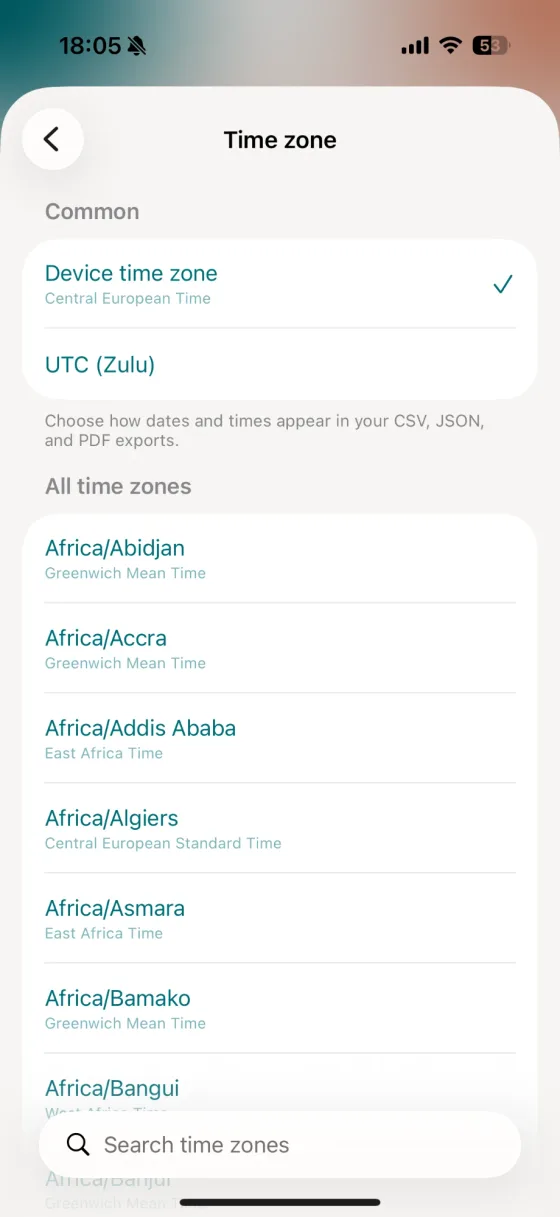
Every timestamp in your CSV, JSON, and PDF exports is written in ISO 8601 format. By default vitalina uses your device time zone and includes its UTC offset, so a workout recorded at 8:39 in Central European Time looks like this:
2026-05-31T08:39:27+02:00 Other Workout 30:29 68 86 65 124 64.1 Marinas WatchPrefer a single absolute reference - useful when combining data across time zones, or matching a clinic's records - you can switch to UTC (Zulu) under Settings → Time zone. The same reading then ends in a Z, for example 2026-05-31T06:39:27Z. The setting applies to all three export formats.
Every exportable metric (131)
vitalina can export 131 distinct Apple Health metrics across nine categories. Each is listed below with the unit it's exported in (metric, with the imperial unit after the slash where it differs). Search to find a specific metric, or browse by category - category names link to a step-by-step export guide where one exists.
Vitals
17Heart, circulatory, and respiratory measurements from iPhone, Apple Watch, and connected devices.
Daily movement, energy, and exercise rings.
Mobility
9Gait, balance, and walking-quality metrics used in physical therapy and rehab.
Weight, composition, and body-size metrics for your dietician or GP.
Nightly sleep sessions with stage breakdown. Exported with a dedicated schema.
Individual workout sessions with duration, distance, energy, and heart rate. Exported with a dedicated schema.
Energy, macronutrients, vitamins, and minerals logged in the Health app or via third-party food trackers.
Menstrual cycle, fertility, and symptom logs for your OB-GYN.
Symptoms like fever, cough, and dizziness logged in Apple Health's General Symptoms section, each with the severity you recorded.
State of Mind mood logs and Mindful Minutes meditation sessions.
Export your own data
vitalina reads your Apple Health data locally on your iPhone and generates these CSV and JSON files in seconds - no account, no cloud upload. It's free to download and try.
Frequently asked questions
What file formats does vitalina export Apple Health data in?
vitalina exports your Apple Health data as PDF (a human-readable report with charts), CSV (for Excel, Google Sheets, and Numbers), and JSON (structured records for developers and data pipelines). CSV and JSON share the schemas documented on this page.
What columns are in a vitalina Apple Health CSV export?
Most metrics use the Health Records schema: Date (ISO 8601), Type, Value, Unit, Source, and Device. Sleep Analysis and Workouts have their own richer column sets - sleep includes per-stage durations and percentages, and workouts include distance, energy, heart-rate range, cadence, elevation, a numeric activity-type code, and the duration in plain seconds. ECG exports add a summary table and a waveform table with the full voltage trace.
Are durations in the JSON export in seconds or minutes?
All durations in the JSON export are in seconds. Null fields indicate the data was not recorded, and all dates use ISO 8601 format. In CSV, sleep and workout durations are formatted as h:mm or h:mm:ss for readability.
What does an empty cell in the CSV mean?
An empty cell means the data was not recorded for that entry - for example, a workout without a heart-rate sensor leaves the heart-rate columns blank. Most spreadsheet apps handle empty cells gracefully.
How many Apple Health metrics can vitalina export?
vitalina can export 131 distinct Apple Health metrics across nine categories: Vitals, Activity, Mobility, Body Measurements, Sleep, Workouts, Nutrition, Cycle Tracking, and Mental Health. Each is listed with its unit in the metric dictionary above.
Is the data encoded in a standard way?
Yes. Every CSV file is a single table with its header on line 1, RFC 4180 escaping, and UTF-8 encoding with a byte-order mark (BOM) so Excel detects the encoding automatically. The files parse in pandas and Python's csv module with zero preprocessing. JSON is pretty-printed with sorted keys, making it easy to diff, parse, and import into analysis tools like pandas or R.
Why does a CSV export sometimes arrive as a zip file?
Each .csv file holds exactly one table. When an export produces more than one table (an Export All report, or an ECG export with waveforms) or includes optional patient details, vitalina packages the files into one zip archive. A metadata.json inside identifies every table by a stable section id and row count, and carries the patient details separately from the data files. Single-metric exports without patient details remain a plain .csv.
What languages does vitalina support?
vitalina is fully localized in 7 languages - English, German, Spanish, French, Portuguese (Brazil), Japanese, Russian. The app interface and every Apple Health metric name are translated, so your exports come out in your language. This page is in English, but the app follows your device language with no setup required. For example, Heart Rate appears as:
| Language | Heart Rate |
|---|---|
| EnglishEnglish | Heart Rate |
| GermanDeutsch | Herzfrequenz |
| SpanishEspañol | Frecuencia cardíaca |
| FrenchFrançais | Fréquence cardiaque |
| Portuguese (Brazil)Português (Brasil) | Frequência cardíaca |
| Japanese日本語 | 心拍数 |
| RussianРусский | Пульс |
Keep reading
Other Apple Health export guides
Step-by-step tutorials for every metric vitalina can export.
- Export Blood PressureSystolic and diastolic readings for your cardiologist.
- Export Heart RateResting, active, and HRV for your cardiologist or sports medicine doctor.
- Export Blood GlucoseCGM and fingerstick readings for your endocrinologist.
- Export Sleep DataSleep stages and duration for sleep specialists.
- Export WeightWeight, BMI, and body fat trends for your dietician or GP.
- Export ActivitySteps, distance, and active energy for physical therapy or rehab.
- Export WorkoutsWorkout sessions with duration, calories, and heart rate.
- Export Cycle TrackingPeriod flow, spotting, cramps, and basal body temperature for your OB-GYN.
- Export Calories & NutritionDaily calories, macros, vitamins, and minerals for your dietician or nutritionist.
- Export ECGApple Watch ECG strips with waveform, classification, and average heart rate for your cardiologist.
- Export Mental Health (State of Mind)Apple Health mental health logs with valence, emotion labels, and life-context associations for your therapist or psychiatrist.
- Export SymptomsGeneral Symptoms like fever, cough, and dizziness with their severity for your doctor.
- Export Apps & DevicesRenpho, Omron, Eight Sleep, Stelo, Flo and more - export data from any app that syncs to Apple Health.
- Export ExcelOpen your Apple Health CSV in Excel and build charts or PivotTables - works on Windows, Mac, and iPad.