
Your health data, ready for your doctor
Export Apple Health data to doctor-friendly PDF reports - with built-in trend charts, not a wall of numbers - or to CSV and JSON, in under 2 minutes. No more screenshots. No more manual transcription.
See it in action
Simple by design
Designed for people, not developers. Tap, pick, export.
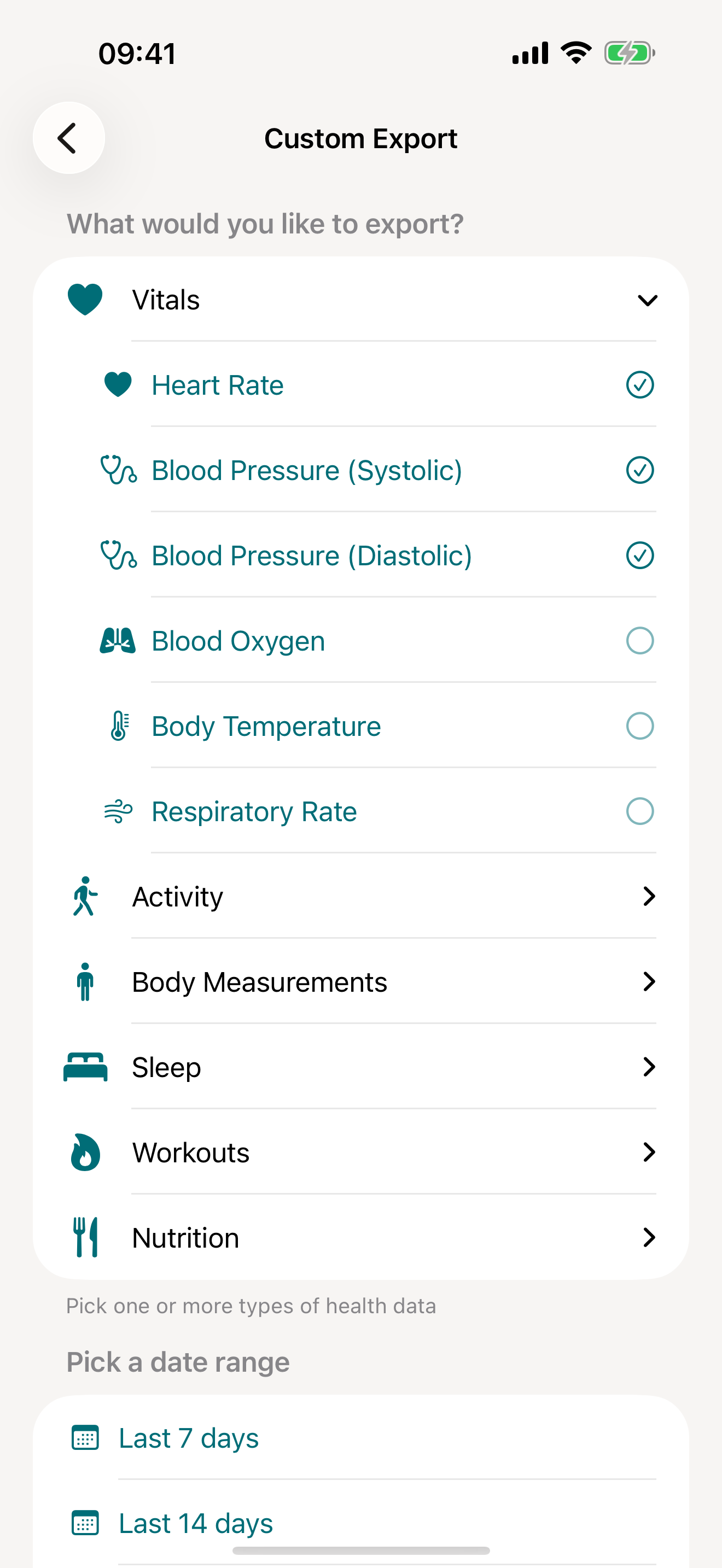
Pick your metrics
Choose from 100+ health metrics across 9 categories
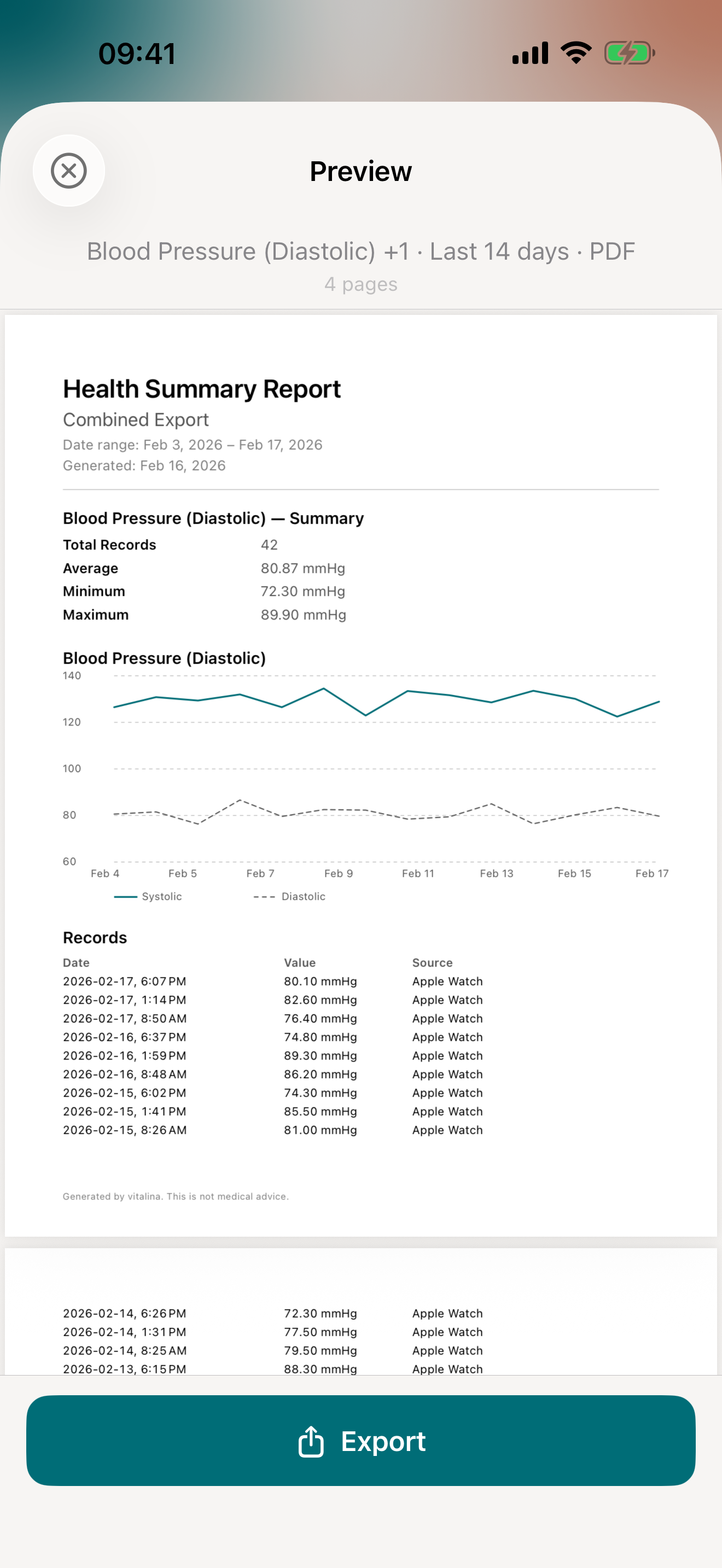
PDF report preview
Doctor-friendly formatting with trend charts
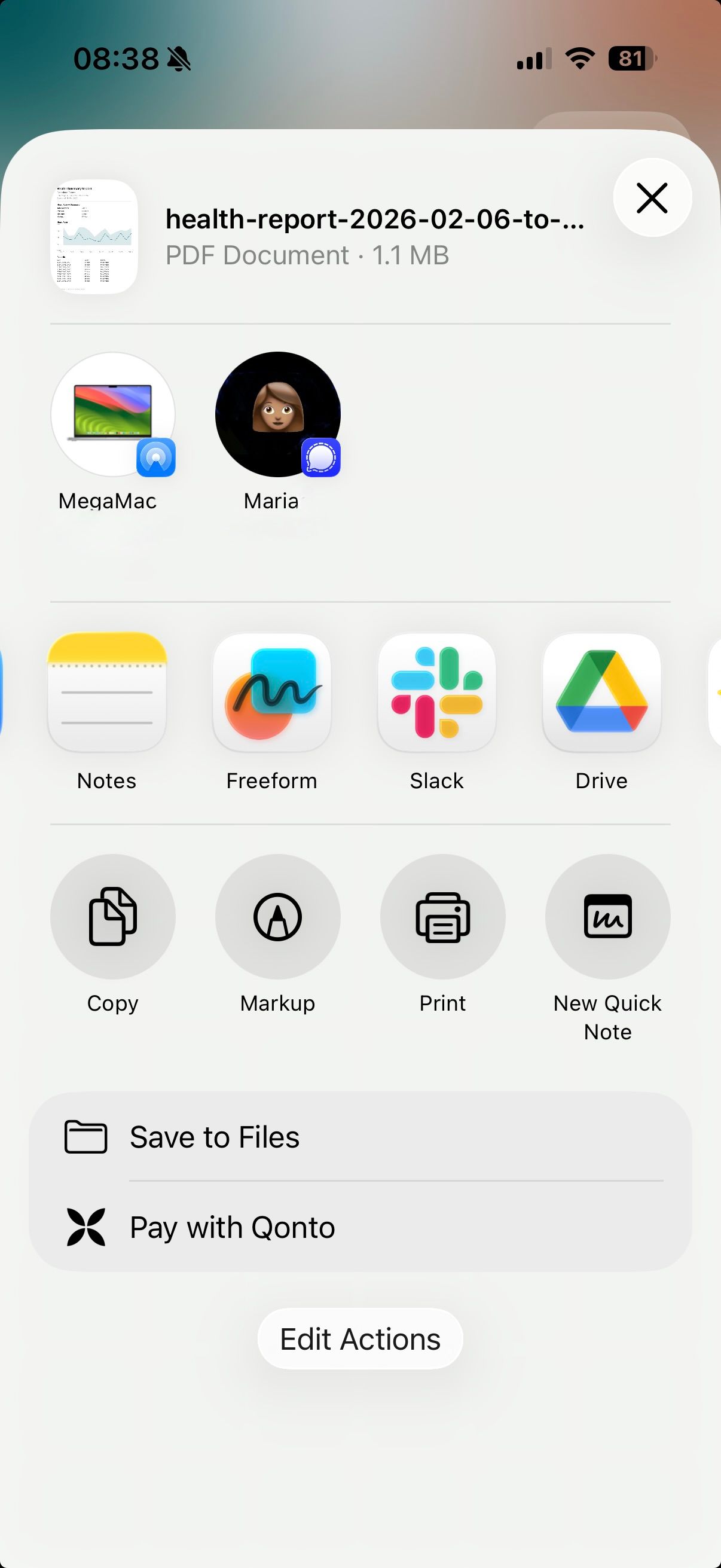
Export & share
Send via AirDrop, email, Messages, or save to Files
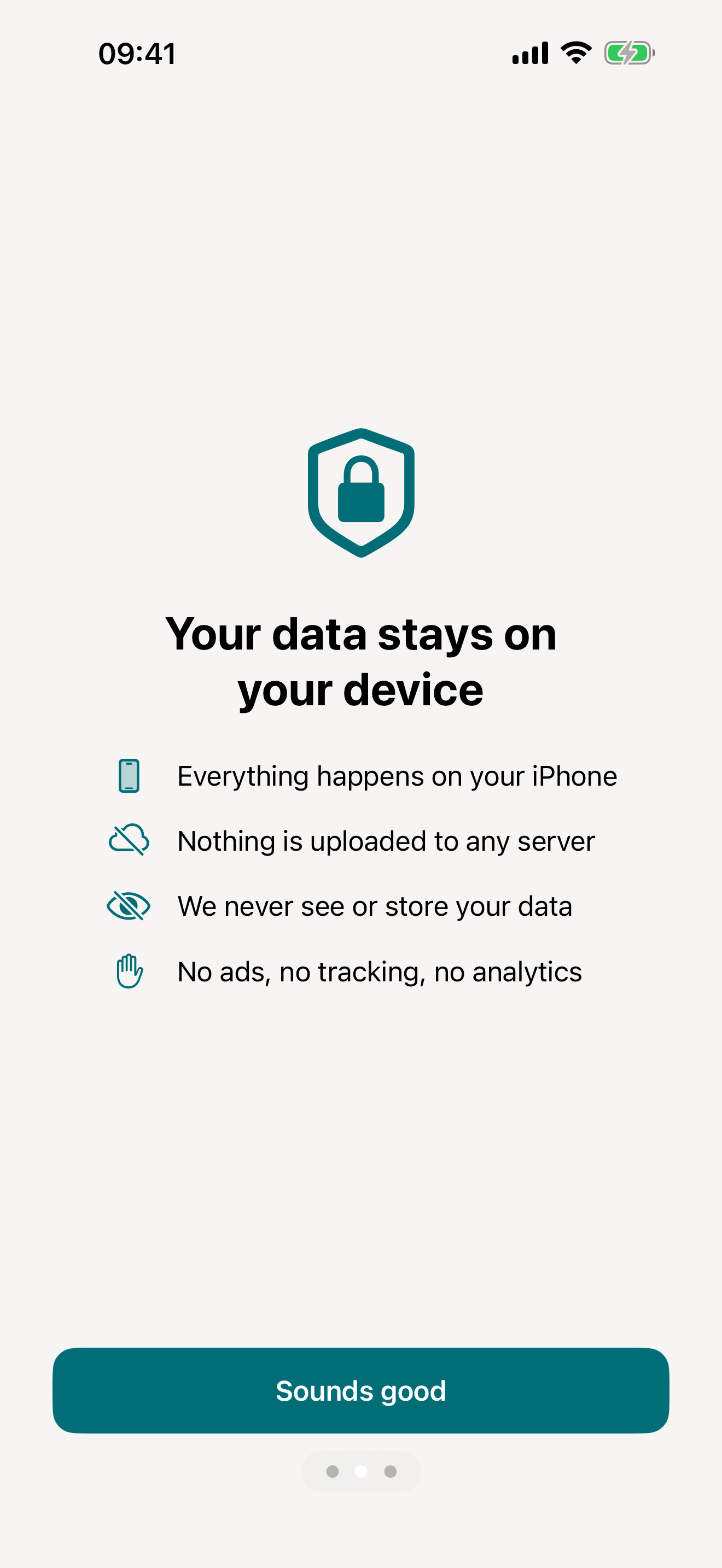
Your data stays yours
No collection, no tracking, ever
The problem
Getting data out of Apple Health is unreasonably hard
vitalina fixes what Apple won't.
Features
Everything you need to share your health data
Doctor-friendly PDF reports
Clean, formatted reports your doctor can read at a glance. No more handing over raw data or screenshots.
Custom date ranges
Pick "last 30 days" or set exact dates. Export only what matters for your next appointment.
Complete sleep & workout data
Sleep stages, duration, REM and deep sleep, heart rate zones, workout summaries. All the data competitors miss.
Blood pressure, cardiac & metabolic vitals
Export blood pressure, glucose, insulin delivery, HRV, AFib burden, walking heart rate, and heart rate recovery. Perfect for chronic condition management.
Scheduled automated exports
Set up daily, weekly, or monthly exports that run automatically - with Siri Shortcuts. Your data, always ready.
Shortcuts setup guideYour data stays on your device
No cloud uploads. No accounts. Your health data never leaves your phone unless you choose to share it.
How it works
From Apple Health to your doctor in 3 simple steps
Pick your metrics
Choose from 100+ health metrics across 9 categories - vitals, activity, mobility, body measurements, sleep, workouts, nutrition, cycle tracking, and mental health.
Pick a date range
Select "last 7 days", "last 30 days", "last 3 months", or set a custom range for your next appointment.
Export & share
Get a clean PDF, CSV, or JSON file. Share it directly with your doctor via email or AirDrop.
Use cases
Export exactly what you need, nothing more
Step-by-step guides for the most common health data exports.
Export Blood Pressure
Systolic and diastolic readings as a clean PDF with trend charts - ready to share with your cardiologist.
Export Heart Rate
Resting and active heart rate, HRV, and more - as a PDF for your cardiologist or sports medicine doctor.
Export Blood Glucose
CGM and fingerstick readings with time-in-range - ready for your endocrinologist or diabetes educator.
Export Sleep Data
Sleep stages, duration, and time in bed - for sleep specialists, CPAP follow-ups, or insomnia treatment.
Export Weight Data
Weight, BMI, and body composition from any smart scale - for your dietician, endocrinologist, or OB-GYN.
Export Activity Data
Steps, distance, active energy, and stand hours - for physical therapy or cardiac rehab progress.
Export Workouts
Workout sessions with duration, type, calories, and heart rate - for sports medicine or your coach.
Export Cycle Tracking
Period flow, spotting, cramps, basal body temperature, and symptoms - for your OB-GYN, endocrinologist, or fertility specialist.
Export Calories & Nutrition
Daily calories, macros, vitamins, and minerals from Yazio, MyFitnessPal, Cronometer, or any food tracker - for your dietician or nutritionist.
Export ECG
Apple Watch ECG strips with waveform, classification, average heart rate, and sampling frequency - on a clinical red grid for your cardiologist.
Export Mental Health (State of Mind)
Apple Health mental health logs - momentary emotions, daily moods, valence, emotion labels, and life-context associations - as a PDF for your therapist or psychiatrist.
Export Symptoms
General Symptoms like fever, cough, shortness of breath, and dizziness - each with the severity you recorded - as a PDF for your doctor.
Guides
What to do with your data once it is exported
Practical workflows for sharing your health data and analyzing it with AI tools.
Share your Apple Health data with your doctor
The best way to export and share heart rate, ECG, cycle, or mood data with a doctor, therapist, or coach.
What to ask ChatGPT about your Apple Health data
Ready-to-use prompts for sleep, heart rate, and workouts. The pillar guide.
Analyze your Apple Health sleep with ChatGPT
Twelve sleep-specific prompts - stage breakdowns, bedtime drift, sleep debt, and recovery correlations.
Pricing
Start free, upgrade once
We hate subscriptions. Pro is a fair, one-time purchase - never more than €4.99 - and your data and your purchase stay yours forever.
Free
0 €
Forever
- 5 unique exports
- PDF, CSV & JSON formats
- Date ranges up to 14 days
- All 100+ health metrics
- Re-export same data and ranges for free
Pro
from 3,99 €
One-time purchase · max €4.99 · varies by region
- Unlimited exports
- Date ranges up to all time
- Siri Shortcuts automation
- Yours forever - no subscription
- Everything in Free
Our Story
Built by two people who just wanted their own data

Martin & Marina
Hi! We're Marina and Martin - a married couple who love running, working out, and geeking out over health data. We've both been wearing an Apple Watch since 2015, so between the two of us that's over 20 years of heart rates, steps, sleep, and workouts.
Martin had this dream of feeding all his running data - paces, heart rate, elevation, seasons of training - into an AI to get a truly personalised training plan. Not some generic 5K programme, but one built on his actual body and history.
Meanwhile, Marina was pregnant and desperately wanted to share her daily health trends with her doctor. Blood pressure, resting heart rate, sleep - all sitting right there in Apple Health.
Turns out? Neither of us could get our data out. Apple's export is a monstrous XML file. So we gave up after 6 and a half hours and a dead battery. Every third-party app wanted a subscription or locked us into yet another dashboard.
We just wanted our own data in a clean format we could actually use. So we did what two people in tech do - we built the thing ourselves.
That's vitalina. Pick your metrics, choose a date range, export. CSV, JSON, or a beautiful PDF for your doctor. No account, no cloud, everything stays on your phone.
Why "vitalina"?
Naming something you love is hard ♥️. We went through dozens of ideas before landing on vitalina - from the Latin vitalis, meaning "full of life". For an app that holds your most intimate health data, it just felt right. Like a little life force in your pocket.
And if you look closely at our logo, you'll see two hands gently embracing a heart. The heart is Apple Health's symbol - and by holding it close, we're saying: this data is yours. It always was. We're just helping you take it home.
FAQ
Common questions
What health data can I export?
vitalina supports 100+ health metrics across 9 categories: vitals (heart rate, resting and walking heart rate, heart rate variability (HRV), heart rate recovery, AFib burden, blood pressure, blood glucose, insulin delivery, blood oxygen, body temperature, respiratory rate, VO2 Max, ECG), activity (steps, distance, flights climbed, active energy, exercise minutes, stand time), mobility (walking speed, walking steadiness, step length, stair speeds), body measurements (weight, height, BMI, body fat percentage, lean body mass, waist circumference), sleep analysis, workouts, nutrition (calories, macros, vitamins, minerals, water), cycle tracking, and mental health (State of Mind, mindful minutes).
What export formats are available?
You can export to PDF (includes trend charts - perfect for sharing with your doctor), CSV (open in Excel or Google Sheets), and JSON (for developers and custom analysis). Each format is optimized for its use case.
Is my health data safe?
Absolutely. Your data never leaves your device unless you explicitly share it. There are no cloud uploads, no sign-up required, and no tracking. vitalina processes everything locally on your iPhone.
Will my doctor understand the PDF report?
Yes. The PDF reports are designed specifically for clinical use, with clear formatting, date ranges, and units your doctor expects. No technical knowledge needed to read them.
Is vitalina free? What does Pro include?
vitalina is free with 5 unique exports, all formats, and date ranges up to 14 days. Pro is a one-time purchase from €3.99 (max €4.99 by region, no subscription) that unlocks unlimited exports, extended date ranges up to all time, and scheduled automated exports. Re-exporting the same data is always free.
Which iPhones are supported?
vitalina requires iOS 18.0 or later. It works on any iPhone that runs iOS 18, including iPhone XS and newer models.
What languages does vitalina support?
vitalina is fully localized in 7 languages - English, German, Spanish, French, Portuguese (Brazil), Japanese, Russian. The app interface and every Apple Health metric name are translated, so your exports come out in your language. For example, Heart Rate appears as Herzfrequenz (German), Frecuencia cardíaca (Spanish), Fréquence cardiaque (French), Frequência cardíaca (Portuguese (Brazil)), 心拍数 (Japanese), Пульс (Russian). This page is written in English, but the app itself follows your device language, with no setup required.
Looking for something more specific? See the full FAQ - exports, Shortcuts, health-data access, and more.
Ready to share your health data the easy way?
Download vitalina and have your first report ready before your next doctor visit.